GateOut
Description
GateOut represents a gate output.
Usage
erbui
module Example {
   control active GateOut {         // 1.
      position 19.2mm, 111mm        // 2.
      style knurled                 // 3.
      label "ACT"                   // 4.
      pin Pin1                      // 5.
   }
}
Creates a gate output control with name
active,Sets the control position on the front panel,
Sets the optional style of the control,
Sets the optional label for the control, using its default theme positioning,
Sets the optional physical board pin to use. If not set, the system will choose it automatically.
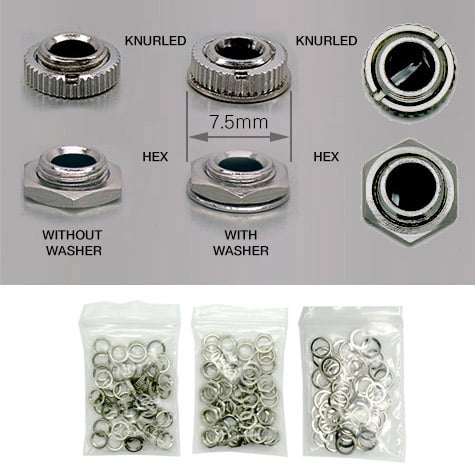
style is the nut style, and is one of:
thonk.pj398sm.knurled,thonk.pj398sm.hex.
Nuts and washers photos are from the Thonk shop.
c++
GateOut is a type that abstracts a physical gate output block.
struct Example
{
   ExampleUi ui;

   void process () {
      if (dsp.activity_changed () && dsp.is_active ()) {
         ui.active.trigger ();                           // 1.
      }
   }
}
Triggers the gate.
erbui Control Reference
control definition
control <name> GateOut { ... }
Where <name> is the name of the control.
More details can be found in control documentation.
position property
position <x>, <y>
Sets the position of the control, where the axis origin is the top-left corner.
The x axis is oriented from left to right, and the y axis is oriented from top to bottom.
The position component values are expressed with their unit, either mm or hp.
Example:
position 2hp, 15mm
More details can be found in position documentation.
style optional property
style <keywords>
Where <keywords> is one of:
knurled(this is the default if not specified),hex.
More details can be found in style documentation.
label optional property
label "<text>"
Where <text> is the text displayed.
More details can be found in label documentation.
c++ Member Functions Synopsys
Name |
Synopsys |
|---|---|
|
Sets the gate value |
|
Turns on the gate |
|
Turns off the gate |
|
Triggers the gate |