# `Display`
## Description
`Display` represents a black and white display.
## Usage
### `erbui`
```erbui
module Example {
control display Display { // 1.
position 19.2mm, 111mm // 2.
style 128x64 // 3.
label "DISPLAY" // 4.
pin Pin1 // 5.
}
}
```
1. Creates an display control with name `display`,
2. Sets the control position on the front panel,
3. Sets the optional style of the control,
4. Sets the optional label for the control, using its default theme positioning,
5. Sets the optional physical board pin to use.
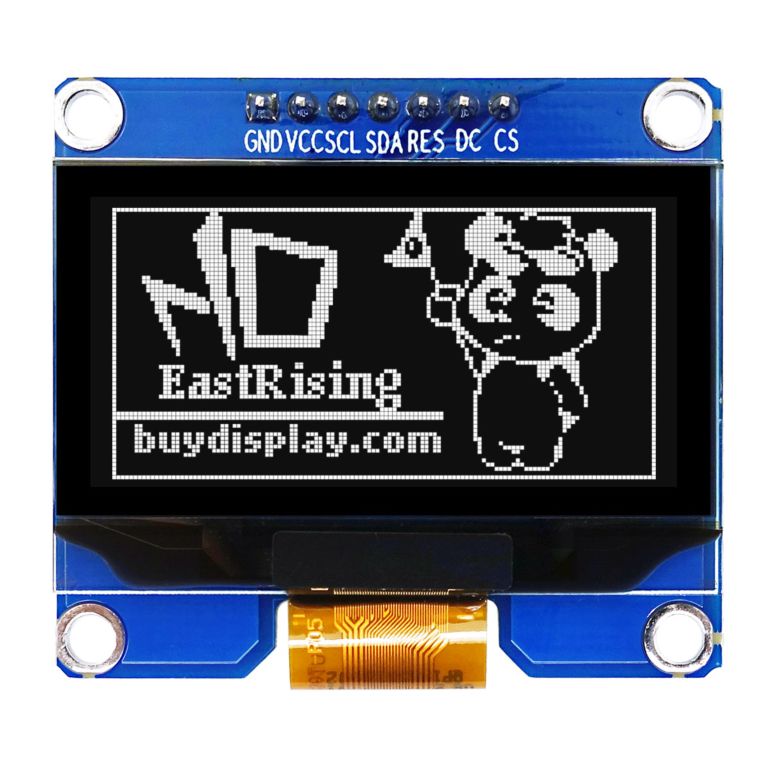 > EastRising 1.54" OLED display photo is from [BuyDisplay](https://www.buydisplay.com/media/catalog/product/cache/53fd08fe2cb06c4269619329bc634cc8/s/e/serial_spi_i2c_white_1.5_inch_arduino_raspberry_pi_oled_display_128x64.jpg).
### `c++`
`Display` is a type that abstracts a physical black and white OLED display block.
```c++
struct Example
{
ExampleUi ui;
void idle () {
ui.display = ExampleData::pic0; // 1.
...
}
}
```
1. Assigns the `pic0` picture to the display.
`pic0` `erbb` resource can be automatically generated from a picture in the
project using the `FormatSsd130x` data type.
```{note}
Note that the display is assigned in the `idle` thread, as a display doesn't
need to (and can't) be updated at `process` rate.
```
## `erbui` Control Reference
### `control` definition
```
control Display { ... }
```
Where `` is the name of the control.
More details can be found in [`control`](../erbui/grammar.html#control) documentation.
### `position` property
```
position ,
```
Sets the position of the control, where the axis origin is the top-left corner.
The `x` axis is oriented from left to right, and the `y` axis is oriented from top to bottom.
The position component values are expressed with their unit, either `mm` or `hp`.
Example:
```
position 2hp, 15mm
```
More details can be found in [`position`](../erbui/grammar.html#position) documentation.
### `style` optional property
```
style
```
Where `` is the first best matching subset of:
- `eastrising, 128x64` (this is the default if not specified),
More details can be found in [`style`](../erbui/grammar.html#style) documentation.
### `label` optional property
```
label ""
```
Where `` is the text displayed.
More details can be found in [`label`](../erbui/grammar.html#label) documentation.
## `c++` Member Functions Synopsys
| Name | Synopsys |
| - | - |
| [`operator =`](#operator-=) | Assigns the display pixels |
| [`operator Storage &`](#operator-storage) | Accesses the display pixels |
| [`fill`](#fill) | Sets all pixels to a value |
## `c++` Member Functions
### `operator =`
```c++
Display & operator = (const Storage & data);
```
Assigns the entire display pixels with the content of `data`.
Each pixel is represented by a bit (and not a byte) and are tightly pack
in a continuous array of bytes.
The bit at location (x, y) can be accessed using this formula:
```c++
storage [x + (y / 8) * width] & (1 << (y % 8)
```
### `operator Storage &`
```c++
operator Storage & ();
```
Accesses the entire display pixels. See upper for the pixels structure.
### `fill`
```c++
void fill (bool val);
```
Sets all pixels of the display to `val`, where `false` represents absence of
light, and `true` represents emission of light.
> EastRising 1.54" OLED display photo is from [BuyDisplay](https://www.buydisplay.com/media/catalog/product/cache/53fd08fe2cb06c4269619329bc634cc8/s/e/serial_spi_i2c_white_1.5_inch_arduino_raspberry_pi_oled_display_128x64.jpg).
### `c++`
`Display` is a type that abstracts a physical black and white OLED display block.
```c++
struct Example
{
ExampleUi ui;
void idle () {
ui.display = ExampleData::pic0; // 1.
...
}
}
```
1. Assigns the `pic0` picture to the display.
`pic0` `erbb` resource can be automatically generated from a picture in the
project using the `FormatSsd130x` data type.
```{note}
Note that the display is assigned in the `idle` thread, as a display doesn't
need to (and can't) be updated at `process` rate.
```
## `erbui` Control Reference
### `control` definition
```
control Display { ... }
```
Where `` is the name of the control.
More details can be found in [`control`](../erbui/grammar.html#control) documentation.
### `position` property
```
position ,
```
Sets the position of the control, where the axis origin is the top-left corner.
The `x` axis is oriented from left to right, and the `y` axis is oriented from top to bottom.
The position component values are expressed with their unit, either `mm` or `hp`.
Example:
```
position 2hp, 15mm
```
More details can be found in [`position`](../erbui/grammar.html#position) documentation.
### `style` optional property
```
style
```
Where `` is the first best matching subset of:
- `eastrising, 128x64` (this is the default if not specified),
More details can be found in [`style`](../erbui/grammar.html#style) documentation.
### `label` optional property
```
label ""
```
Where `` is the text displayed.
More details can be found in [`label`](../erbui/grammar.html#label) documentation.
## `c++` Member Functions Synopsys
| Name | Synopsys |
| - | - |
| [`operator =`](#operator-=) | Assigns the display pixels |
| [`operator Storage &`](#operator-storage) | Accesses the display pixels |
| [`fill`](#fill) | Sets all pixels to a value |
## `c++` Member Functions
### `operator =`
```c++
Display & operator = (const Storage & data);
```
Assigns the entire display pixels with the content of `data`.
Each pixel is represented by a bit (and not a byte) and are tightly pack
in a continuous array of bytes.
The bit at location (x, y) can be accessed using this formula:
```c++
storage [x + (y / 8) * width] & (1 << (y % 8)
```
### `operator Storage &`
```c++
operator Storage & ();
```
Accesses the entire display pixels. See upper for the pixels structure.
### `fill`
```c++
void fill (bool val);
```
Sets all pixels of the display to `val`, where `false` represents absence of
light, and `true` represents emission of light.