# `Button`
## Description
`Button` represents a mechanical push-button switch.
## Usage
### `erbui`
```erbui
module Example {
control arm Button { // 1.
position 19.2mm, 111mm // 2.
style small, black // 3.
label "ARM" // 4.
pin Pin1 // 5.
}
}
```
1. Creates a button control with name `arm`,
2. Sets the control position on the front panel,
3. Sets the optional style of the control,
4. Sets the optional label for the control, using its default theme positioning,
5. Sets the optional physical board pin to use. If not set, the system will choose it automatically.
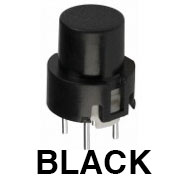 > C&K D6R Black photo is from the [Thonk shop](https://www.thonk.co.uk/shop/radio-music-switch/).
### `c++`
`Button` is a type that abstracts a physical button block.
```c++
struct Example
{
ExampleUi ui;
void process () {
if (ui.arm.pressed ()) { // 1.
...
}
}
}
```
1. Checks if the button was just pressed.
## `erbui` Control Reference
### `control` definition
```
control Button { ... }
```
Where `` is the name of the control.
More details can be found in [`control`](../erbui/grammar.html#control) documentation.
### `position` property
```
position ,
```
Sets the position of the control, where the axis origin is the top-left corner.
The `x` axis is oriented from left to right, and the `y` axis is oriented from top to bottom.
The position component values are expressed with their unit, either `mm` or `hp`.
Example:
```
position 2hp, 15mm
```
More details can be found in [`position`](../erbui/grammar.html#position) documentation.
### `style` optional property
```
style
```
Where `` is the first best matching subset of:
- [`tl1105, small, black`](https://www.digikey.de/product-detail/en/e-switch/TL1105SPF250Q/EG1862-ND/271559) (this is the default if not specified),
- [`ck, d6r, black`](https://www.thonk.co.uk/shop/radio-music-switch/).
More details can be found in [`style`](../erbui/grammar.html#style) documentation.
### `label` optional property
```
label ""
```
Where `` is the text displayed.
More details can be found in [`label`](../erbui/grammar.html#label) documentation.
## `c++` Member Functions Synopsys
| Name | Synopsys |
| - | - |
| [`idle`](#idle) | Returns `true` iff the button is neither pressed, held or released |
| [`pressed`](#pressed) | Returns `true` iff the button was pressed |
| [`held`](#held) | Returns `true` iff the button is held |
| [`released`](#released) | Returns `true` iff the button was released |
## `c++` Member Functions
### `idle`
```c++
bool idle () const;
```
Returns `true` if and only if the button was neither pressed, held or released.
### `pressed`
```c++
bool pressed () const;
```
Returns `true` if and only if the button was just pressed.
After the button has finished bouncing, it will take 7 process cycles, so 7ms if the buffer
size is 48 samples, for the change to be detected.
### `held`
```c++
bool held () const;
```
Returns `true` if and only if the button is being held down.
### `released`
```c++
bool released () const;
```
Returns `true` if and only if the button was just released.
After the button has finished bouncing, it will take 7 process cycles, so 7ms if the buffer
size is 48 samples, for the change to be detected.
> C&K D6R Black photo is from the [Thonk shop](https://www.thonk.co.uk/shop/radio-music-switch/).
### `c++`
`Button` is a type that abstracts a physical button block.
```c++
struct Example
{
ExampleUi ui;
void process () {
if (ui.arm.pressed ()) { // 1.
...
}
}
}
```
1. Checks if the button was just pressed.
## `erbui` Control Reference
### `control` definition
```
control Button { ... }
```
Where `` is the name of the control.
More details can be found in [`control`](../erbui/grammar.html#control) documentation.
### `position` property
```
position ,
```
Sets the position of the control, where the axis origin is the top-left corner.
The `x` axis is oriented from left to right, and the `y` axis is oriented from top to bottom.
The position component values are expressed with their unit, either `mm` or `hp`.
Example:
```
position 2hp, 15mm
```
More details can be found in [`position`](../erbui/grammar.html#position) documentation.
### `style` optional property
```
style
```
Where `` is the first best matching subset of:
- [`tl1105, small, black`](https://www.digikey.de/product-detail/en/e-switch/TL1105SPF250Q/EG1862-ND/271559) (this is the default if not specified),
- [`ck, d6r, black`](https://www.thonk.co.uk/shop/radio-music-switch/).
More details can be found in [`style`](../erbui/grammar.html#style) documentation.
### `label` optional property
```
label ""
```
Where `` is the text displayed.
More details can be found in [`label`](../erbui/grammar.html#label) documentation.
## `c++` Member Functions Synopsys
| Name | Synopsys |
| - | - |
| [`idle`](#idle) | Returns `true` iff the button is neither pressed, held or released |
| [`pressed`](#pressed) | Returns `true` iff the button was pressed |
| [`held`](#held) | Returns `true` iff the button is held |
| [`released`](#released) | Returns `true` iff the button was released |
## `c++` Member Functions
### `idle`
```c++
bool idle () const;
```
Returns `true` if and only if the button was neither pressed, held or released.
### `pressed`
```c++
bool pressed () const;
```
Returns `true` if and only if the button was just pressed.
After the button has finished bouncing, it will take 7 process cycles, so 7ms if the buffer
size is 48 samples, for the change to be detected.
### `held`
```c++
bool held () const;
```
Returns `true` if and only if the button is being held down.
### `released`
```c++
bool released () const;
```
Returns `true` if and only if the button was just released.
After the button has finished bouncing, it will take 7 process cycles, so 7ms if the buffer
size is 48 samples, for the change to be detected.